
September 15, 2026 · 11 min read · By MagicBG Team
Amazon Product Image Requirements: Complete Guide to Product Photos
Amazon product image requirements explained: size, format, file limits, white background and main image rules, plus a checklist for preparing listing photos.
You have the product photos. You upload them. And then something goes wrong — the image is rejected, the zoom function doesn't activate, the photo looks washed out next to competing listings, or worst of all the listing gets suppressed from search results. Amazon states plainly that images which don't meet its standards "may be rejected, removed, or altered" and that non-compliant images can lead to a listing being suppressed from search (Amazon Seller Forums, Listings Lounge).
This guide covers what Amazon actually requires, what it merely prefers, and what is simply good practice. Those three things get blended together constantly in seller advice, and the difference matters: a preference you ignore costs you clicks, a requirement you ignore can cost you the listing. By the end you will know the technical specs, the main image rules, how to build a useful image set, and how to check a photo before you upload it.
Amazon product image requirements at a glance
These are the technical rules Amazon publishes for all product images. Everything in this table comes from Amazon's own seller documentation.
| Requirement | What Amazon states | Status |
|---|---|---|
| Minimum images | Every product must have at least one image | Requirement |
| Dimensions | 500 to 10,000 pixels on the longest side | Requirement |
| File formats | JPEG (.jpg / .jpeg), TIFF (.tif), PNG (.png) or non-animated GIF (.gif) | Requirement |
| Image quality | Clear, with no pixelation or jagged edges | Requirement |
| Zoom-friendly size | Amazon prefers images larger than 1,000 px on the longest side, which enables zoom | Preference |
| Preferred format | Amazon states it prefers JPEG | Preference |
| Number of images | Amazon recommends at least six images and one video | Recommendation |
| Main image background | Pure white background, per Amazon's product image guide | Requirement (main image only) |
Source for the technical rows: Technical image file requirements and the Product image guide in Seller Central.
One important caveat before you go further. Amazon does not apply an identical rulebook to every category, product type and regional store. Apparel, media, books and some regulated categories have their own style guides, and a requirement in one store is not automatically a requirement in another. Marketplace policy also changes. Treat this guide as your working reference and confirm the current rules for your specific category in Seller Central before a large upload.
Amazon main image requirements
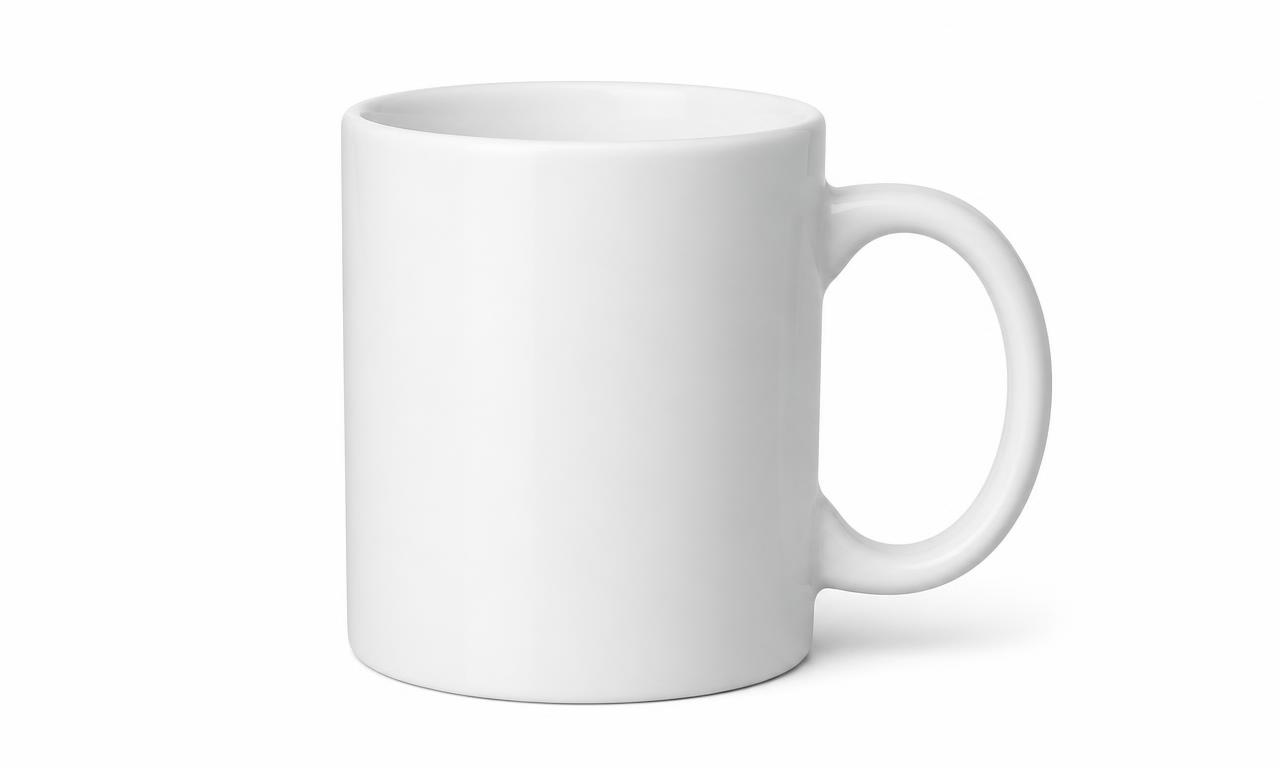
The main image is the one shoppers see in search results, so Amazon holds it to stricter standards than the rest of your gallery. According to Amazon's product image guide, a compliant main image shows the actual product for sale, photographed on a pure white background, with the product filling the frame and nothing added on top of it — no text, no logos, no watermarks, no borders, no promotional badges, and no props or accessories that aren't included in the purchase.
The "pure white" part is more literal than most sellers expect. A background that looks white on your screen may still be a light gray once you sample the pixels. If you shot on a white sweep in natural light, the backdrop will almost certainly carry a slight color cast. The reliable fix is to cut the product out and place it on a genuinely white canvas rather than trying to brighten the original backdrop, which tends to blow out the product's own highlights along with the background.
Do
- Use a real photograph of the item you are actually selling.
- Fill most of the frame with the product so it reads clearly at thumbnail size.
- Place the product on a clean, genuinely white background.
- Show the complete product, in focus, with accurate color.
- Keep a small, even margin so the product isn't cropped at the edges.
Don't
- Add text, price callouts, "best seller" badges or promotional graphics.
- Include watermarks or your own logo overlay.
- Show props or accessories a buyer won't receive.
- Use an illustration, render or mockup where a photograph is expected.
- Leave a visible border, frame or colored edge around the image.
A practical note: the 85% fill figure circulates widely in seller communities as the target for how much of the frame the product should occupy. It is a sensible framing benchmark and worth aiming for, but check your category's current style guide rather than treating one number as universal across all of Amazon.
Amazon product image size and dimensions
The hard rule is simple: the longest side must fall between 500 and 10,000 pixels. Anything outside that range will not be accepted.
The practical rule matters more. Amazon states it prefers images larger than 1,000 pixels on the longest side because that is what enables the zoom function, and it notes that zoom has been shown to help sales. So while a 600 × 600 image technically passes, it gives shoppers no way to inspect fabric texture, connector types, stitching or print quality — exactly the details that decide a purchase. Uploading at 1,600 to 2,000 pixels square is a comfortable target: well past the zoom threshold, still a reasonable file size.
Aspect ratio. A square 1:1 image is the safest choice because it matches how Amazon frames product thumbnails, and it means the platform's own crops never cut into your product. Non-square images are accepted, but they get letterboxed or cropped in ways you don't control.
Never stretch to fit. If your photo is 1,400 × 1,000 and you want a square, do not scale it to 1,400 × 1,400 — that distorts the product and misrepresents its proportions. Add white canvas instead.
Worked example: turning a 4:3 photo into a square listing image
- Start with the original at, say, 3,024 × 2,268 pixels.
- Remove the background so the product sits on transparency.
- Place it on a square white canvas — 2,000 × 2,000 works well.
- Scale the product so it fills most of that square, keeping its original proportions.
- Center it and leave a small even margin on all sides.
- Export as JPEG.
Every step there is a resize, a crop or a background change — which is exactly the workflow MagicBG's white background maker and image resizer handle in the browser. Check your product image → run it through the free AI background remover and see how it looks on white.
Amazon image format and file size requirements
Amazon accepts JPEG (.jpg or .jpeg), TIFF (.tif), PNG (.png) and non-animated GIF (.gif), and states that it prefers JPEG. Animated GIFs are not part of that accepted list.
In practice JPEG is the right answer for anything you upload. It handles photographic detail efficiently, keeps files small enough to load quickly, and is the format Amazon itself prefers. Save at high quality — heavy compression produces blocky artifacts around edges and text, which runs straight into the "clear, no pixelation" requirement.
PNG earns its place earlier in the process, not at upload. When you remove a background, PNG is the format that preserves transparency, so it's what you work with while you're compositing the product onto a white canvas or reusing the same cutout across several backgrounds. Flatten to JPEG as the final export step. If you want the longer comparison, we cover it in PNG vs WebP for transparent images.
On file size and color profile. A 10 MB per-image ceiling and an sRGB color profile recommendation are both widely cited by seller tools and agencies. We are not restating them as verified Amazon rules here because we could not confirm them in Amazon's current published requirements. sRGB is nonetheless the sensible working choice for anything displayed on the web — Adobe RGB files often look desaturated in browsers — and keeping files well under 10 MB costs you nothing.
Listing image requirements beyond the main image
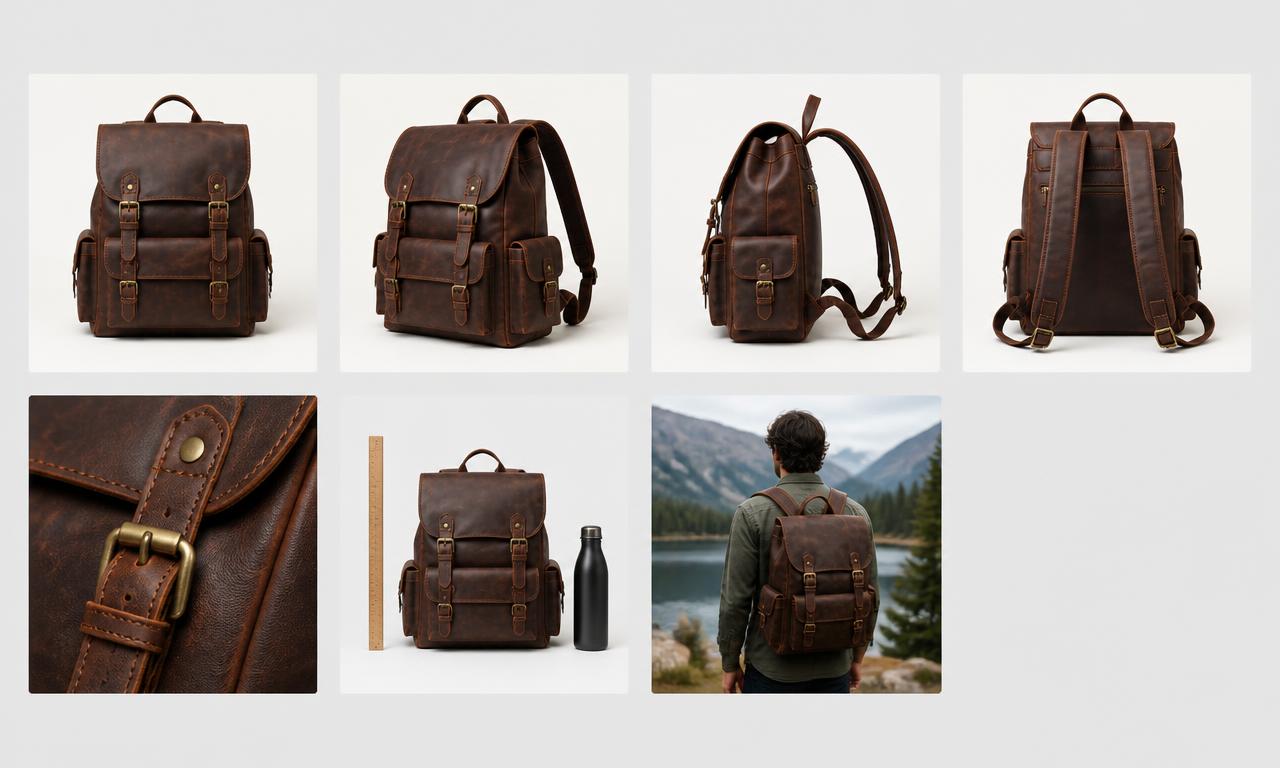
Amazon recommends at least six images plus a video. This is where most listings underperform — sellers obsess over the main image and then upload three near-identical angles for the rest.
Secondary images are far less restricted than the main image. Lifestyle shots, alternative backgrounds, text overlays and infographics are generally acceptable in the supporting slots where they aren't in the main slot. That freedom exists so you can answer objections: how big is it, what's in the box, how does it work, what does it look like in use.
A practical sequence that works for most physical products:
- 1. Main image — product on white, compliant, clear at thumbnail size.
- 2. Detail shot — material, texture, finish or a key component close up.
- 3. Side or back view — what the main angle hides.
- 4. Dimensions — measurements, or the product next to a familiar reference object.
- 5. Key feature — the single thing that makes this product worth choosing.
- 6. Lifestyle / in use — the product in context, at realistic scale.
- 7. What's included — packaging contents or accessories.
This is a starting template, not a rule. A kitchen appliance needs a different set from a phone case. Look at the questions buyers actually ask in your category's reviews and answer them visually.
10 common Amazon product image mistakes
- 1. A background that isn't actually white. Off-white, gray-cast or gradient backdrops on the main image. Fix: cut the product out and place it on a true white canvas rather than brightening the original.
- 2. Product too small in the frame. It disappears at thumbnail size. Fix: crop tighter and scale the product up so it dominates the square.
- 3. Blurry or soft images. Fails the "clear, no pixelation" requirement outright. Fix: reshoot with more light and a steadier setup — you cannot sharpen your way out of a soft capture.
- 4. Excessive empty space. Usually a symptom of uploading the camera file untouched. Fix: crop to the product, then pad back to square.
- 5. A distorted product. Caused by stretching a rectangle into a square. Fix: always scale proportionally and add canvas instead.
- 6. Text or promotional graphics on the main image. "50% off", feature callouts, badges. Fix: move all of it to the secondary slots, where it's allowed.
- 7. Watermarks. Your logo across the corner of the main image. Fix: remove it — protect your photos elsewhere, not on the listing.
- 8. Poor cropping. Parts of the product cut off at the frame edge. Fix: keep a small, consistent margin all the way around.
- 9. Inconsistent secondary images. Different lighting, white balance and scale across the gallery makes a catalog look amateur. Fix: process the whole set with the same settings.
- 10. Over-compressed files. Chasing a small file size produces visible blocking around edges. Fix: export JPEG at high quality — a clean 1 MB file beats a mushy 200 KB one.
Amazon product image checklist
Run through this before any upload. Items marked (R) are Amazon requirements; the rest are best practice.
- ☐ Format is JPEG, TIFF, PNG or non-animated GIF (R)
- ☐ Longest side is between 500 and 10,000 pixels (R)
- ☐ Image is clear, with no pixelation or jagged edges (R)
- ☐ Main image has a pure white background (R)
- ☐ Longest side is over 1,000 px so zoom works (Amazon preference)
- ☐ Saved as JPEG (Amazon preference)
- ☐ Square 1:1 aspect ratio
- ☐ Product fills most of the frame and is fully visible
- ☐ No text, logos, watermarks, borders or props on the main image
- ☐ Product proportions are undistorted
- ☐ Cropping leaves an even margin on all sides
- ☐ At least six images, each showing something new (Amazon recommendation)
- ☐ Category-specific rules checked in Seller Central
From raw product photo to Amazon-ready image
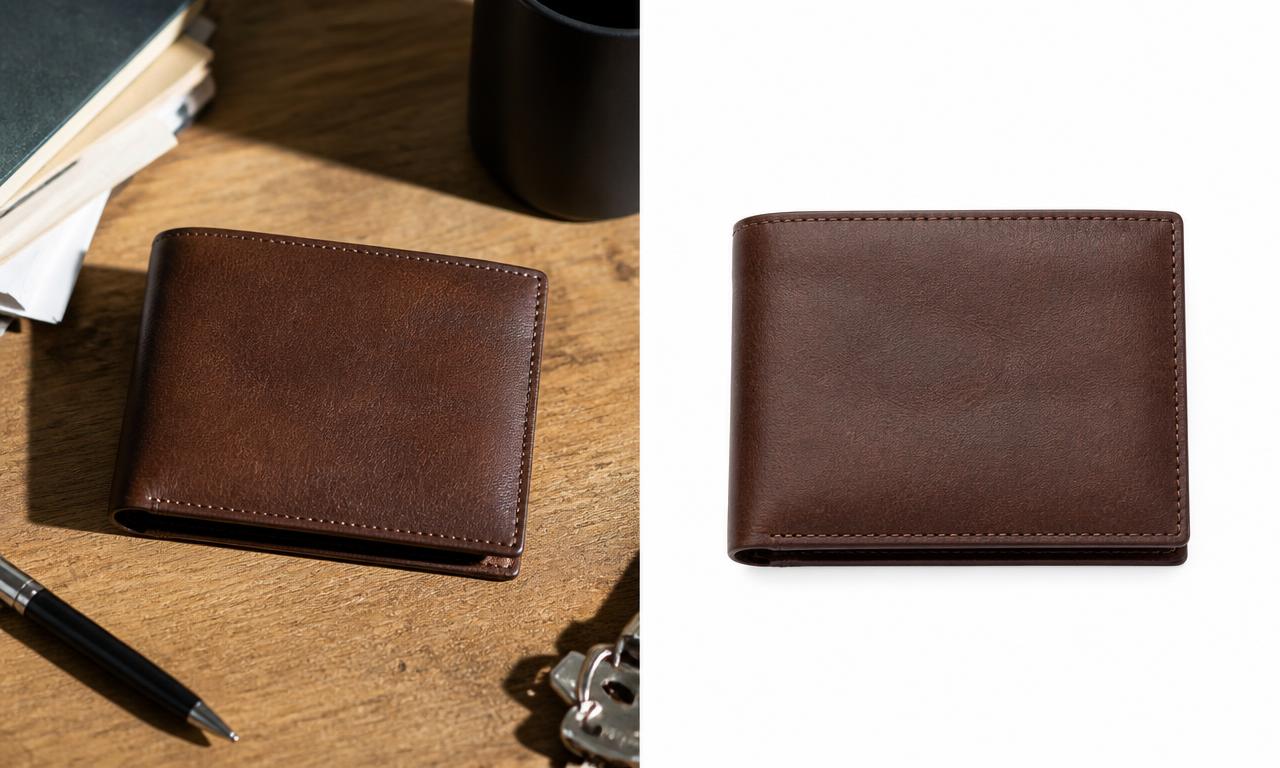
The photo on the left is a perfectly good photograph and a non-compliant main image. The desk, the shadow, the pen and keys in frame — all fine for a lifestyle slot, none of it acceptable where Amazon expects white. Getting from left to right is four steps:
- Remove the background so the product sits on transparency.
- Place it on white — a genuinely white canvas, not a brightened backdrop.
- Crop and resize to a square at 1,600 px or more, scaling proportionally.
- Export as JPEG at high quality.
The result is prepared for Amazon's published image requirements. It is not a guarantee of approval — Amazon reviews listings against category rules and product accuracy that no image tool can evaluate for you.
Prepare your product images faster with MagicBG
Those four steps are straightforward for one product. For forty, they become the reason listings sit unpublished for weeks. MagicBG exists to compress that work:
- AI background remover — isolate the product in a few seconds, free and in the browser.
- White background maker — place the cutout on a clean white canvas.
- Cropper and resizer — square up and scale without distorting the product.
- Marketplace image optimizer — apply per-marketplace presets and export a whole batch at once.
- Product Studio — background replacement and higher-resolution output for larger catalogs.
The background remover, white background maker, cropper, resizer and marketplace image optimizer run in your browser. Product Studio uses a remote AI provider for AI scene generation. Prepare your product photos →
Amazon product image requirements FAQ
What size should Amazon product images be?
The longest side must be between 500 and 10,000 pixels. Amazon prefers images over 1,000 pixels on the longest side because that enables zoom, so 1,600 × 1,600 or larger is a practical target.
What format should Amazon product images use?
Amazon accepts JPEG, TIFF, PNG and non-animated GIF, and states that it prefers JPEG. JPEG is the right choice for uploads; use PNG only while you're working with transparency.
Does Amazon require a white background?
For the main image, yes — Amazon's product image guide specifies a pure white background. Secondary images are not held to that rule and may use lifestyle settings, alternative backgrounds or graphics.
Can Amazon product images contain text?
Not on the main image, which must be free of text, logos, watermarks and promotional graphics. Text overlays and infographics are generally acceptable on secondary images.
How many images should an Amazon listing have?
Amazon recommends at least six images and one video. Only one image is strictly required, but six well-chosen photos answer far more buyer questions than one.
Can I resize an image for Amazon without losing quality?
Scaling down is essentially lossless. Scaling up past the original resolution adds softness, so always start from the largest file your camera produced, and never stretch a rectangle into a square — add white canvas instead.
Do the rules differ between Amazon stores and categories?
Yes. Categories such as apparel, media and some regulated products have their own style guides, and regional stores can differ. Check the current guidance for your category in Seller Central before a large upload.
Bottom line
The requirements that matter are short: an accepted file format, a longest side between 500 and 10,000 pixels, a clear unpixelated image, and a pure white background on the main shot. Above that floor, the preferences are what actually move the needle — comfortably over 1,000 pixels so zoom works, JPEG, square, and at least six images that each tell the buyer something new.
Compliant images are the entry ticket, not the finish line. A listing that ranks and converts also needs a title, bullets, description and keywords that match what the images show. That full sequence — prepare the image, optimize it per marketplace, generate the listing content, export the package — is what the Complete Listing Generator was built for. Create your marketplace-ready product listing →
For the photography side of the workflow, our guide to e-commerce product photos that convert covers lighting and setup before any of this editing begins. Amazon's own documentation remains the authority: review the product image guide and technical image file requirements in Seller Central, because marketplace policies change.
See how these rules differ across channels in the marketplace image requirements comparison.
Before uploading, run the photo through the free image compliance checker.